Here’s one of the very best tips I got at RE BarCamp last week:
“Backup to Gmail” is a Droid application that you can download immediately from the Marketplace.
This is a MUST HAVE type of app for any REALTOR®.
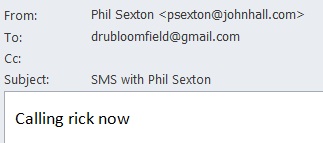
Download and install it, and then your call log, multi-media messages and simple text messages are backed up to your Gmail account in folders called “Call Log”, “MMS” and “SMS.”
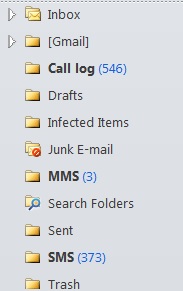
It’s easy, simple AND cheap.
Cost: $1.99
With this app, or something similar like Backup SMS+,you will have a history of your conversations with clients, office and servicers, which is searchable. And, as we become more and more reliant on texting as a way of communicating in our business, it’s absolutely critical to be able to document and track our conversations, easily and effectively.
Enjoy this post? Get the latest blog.aaronline.com posts sent to you by subscribing via email or RSS.


{ 5 comments… read them below or add one }
If you have an iPhone, you have two choices. Plug the phone in to back it up (free but not real time).
Purchase a mobile me subscription that keeps everything backed up, and provides an extra cool feature. If you misplace your phone, you can lock it, send a message to it, and locate it on GPS from any computer or ipad or other iphone.
Great tip Dru. Thank you for posting! –Ed
Victor, Thanks for the iPhone recommendations. Really good for users to know.
Ed, You are welcome!
My pleasure.
Btw, I have confirmed that “Backup to Gmail” also works with Google Apps (not all Gmail apps do).
Which is great for Google Apps users.
– Ed
Another option, though maybe not as elegant, is to take a screen shot of the text message and drop it into Evernote or Dropbox. Screen shot an iPhone by pressing home & power buttons. No idea how to do it on a droid, but surely it can be done.